

Ordering groceries for my parents in Dubai is straightforward when I start with their needs, browse available items, and review delivery details before placing the order. I can add fresh produce, check what’s currently available, and use customer care chat if I need help while ordering. The key is to confirm the delivery information for their address before checkout.
It’s a practical way to help from near or far, especially when you want your parents to receive familiar foods without having to shop in person. This guide walks you through browsing groceries, checking product availability and delivery details, choosing fruits and vegetables, and using chat for assistance. Follow the steps to make the order clear and suited to what your parents actually need.
Key Takeaways
- Start with your parents’ grocery needs, then browse categories and choose items that suit their routine.
- Review product availability and delivery details for their address before completing an order.
- Add fruits and vegetables, and use customer care chat if you need help while ordering.
- Compare grocery app options by the products they carry and the delivery details they show.
Ordering groceries online in Dubai
Yes, you can place an online grocery order for your parents in Dubai. Enter their delivery details, choose groceries for their household, and review the order before paying.
Choose Groceries for Your Parents
Start with the items your parents use most, such as fruit, vegetables, pantry staples, snacks, and drinks. When ordering groceries for my parents in Dubai, I’d use the store’s categories to find suitable choices, then confirm preferences with them before adding unfamiliar brands. Consider how quickly they’ll use each item and whether they have space to store it. This keeps the basket practical and personal.
- Compare the basket’s prices and product options before checkout. Grocery prices differ between supermarkets in Dubai, and online stores let shoppers compare offerings. Carrefour, Al-Futtaim, and Spinneys are among the supermarkets named in local shopping guides. Compare like-for-like items by size and price per unit, rather than choosing only by the displayed total. Check quantities too, so a larger pack doesn’t exceed what your parents can use.
For a useful comparison, review the produce and pantry items your parents actually need. Make a short list, then compare the available products, pack sizes, and prices. This keeps the decision focused on their household rather than the number of products in a catalogue.
Pay for the Online Order
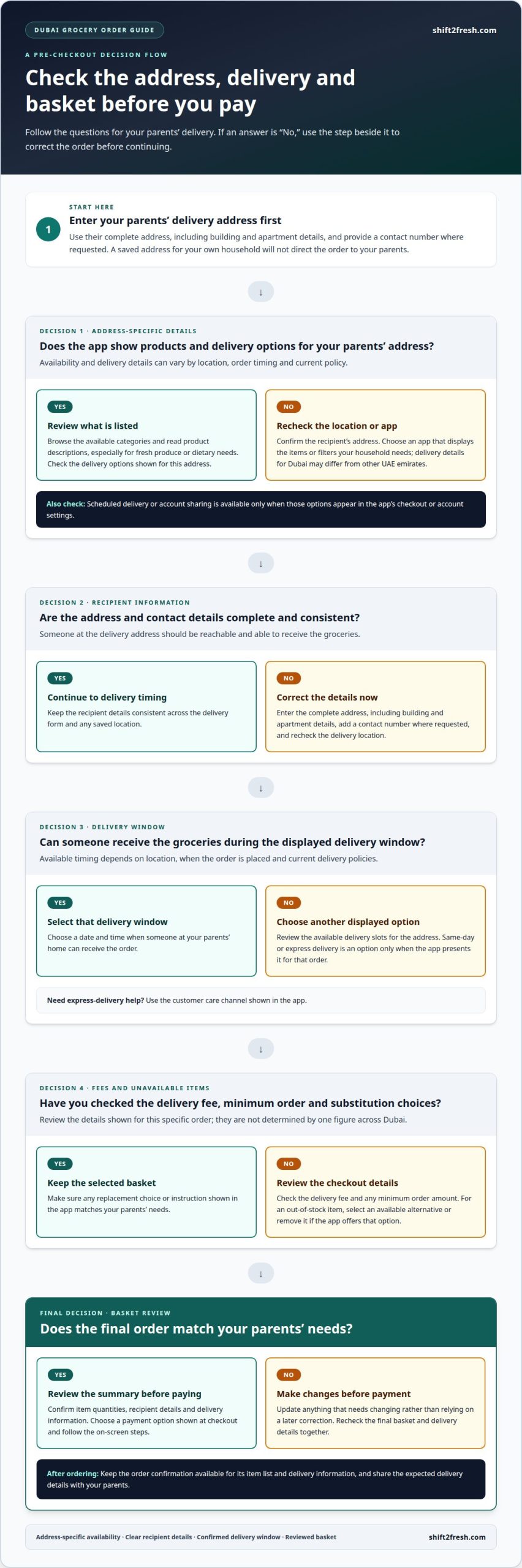
Open checkout after reviewing the basket, recipient details, and delivery address. Select a payment option shown at checkout, then follow the on-screen steps to complete the transaction. Before submitting, check the order summary, including item quantities and delivery details. If something needs changing, update it before payment rather than relying on a later correction.
Keep the order confirmation available so you can refer to its item list and delivery information. Ordering groceries for my parents in Dubai is easier to coordinate when I share the expected delivery details with them. They’ll know which order to expect without needing to manage the online checkout themselves.
Reviewing product availability and delivery details
Before checkout, match the basket to your parents’ household and delivery address. Availability, timing, and delivery information can depend on location, order timing, and current policy.
Check Grocery Availability
Enter the recipient’s address first, then review which products and delivery options appear. Dubai delivery details may differ from those for other UAE emirates, so use the address-specific information shown in the app. For fresh produce or dietary needs, browse the available categories and read each product description. Choose an app that displays the items or filters your household needs.
Apps with scheduled delivery or account sharing are those whose checkout or account settings show those options. Review the available delivery slots and sharing controls before relying on them.
Enter Delivery Address and Contact Details
Enter your parents’ complete address, including building and apartment details, and provide a contact number where requested. Make sure someone at the delivery address can be reached and can receive the groceries. Recheck the address before continuing; a saved address for your own household will not direct the order to your parents.
Clear recipient details help direct the order to the right household. Keep the address consistent across the delivery form and any saved location.
Choose a Delivery Date and Time
Select a delivery window displayed for your parents’ address. Timing and available slots can depend on location, when you place the order, and current delivery policies. Same-day or express delivery is available only when the app presents it as an option for that order. For express delivery contact options, use the customer care channel shown in the app.
Choose a delivery date when someone can receive the groceries, especially if your parents will not be home throughout the day.
Review Delivery Fees and Substitutions
Review the checkout total for delivery fees and any minimum order amount before paying. These details are shown for the order rather than determined by one figure across Dubai. For out-of-stock items, read any substitution choices or instructions displayed in the app, then select an alternative or remove the item if that option is available.
Check the final basket and delivery details together. This keeps the order aligned with your parents’ needs and avoids relying on an unselected replacement.
Including fruits and vegetables
Fresh produce in Dubai is often imported, so the selection can change. Build the produce part of your parents’ basket around what they enjoy and can use.
- Ask your parents which fruits and vegetables they want before browsing. A short list, such as fruit for snacks and vegetables for familiar meals, keeps the order relevant. Note their preferred types and practical quantities so you can choose suitable options rather than adding items simply because they appear in the catalogue.
- Browse the produce categories and look at the item descriptions before adding anything. Check whether the product is sold individually, by weight, or in a pack, then choose a quantity that fits your parents’ household. In Dubai, imported produce may vary in availability, so revisit the category if a preferred choice isn’t displayed.
- Choose fruit with your parents’ routine in mind. Select familiar options they can eat as snacks or use at breakfast, rather than ordering several unfamiliar items. Consider how much they can finish before choosing a larger quantity. This makes the selection practical and helps reduce leftovers.
- Add vegetables based on meals your parents already prepare. If they cook regularly, choose produce that fits those dishes; if they prefer simple meals, focus on vegetables they know how to use. Read the product descriptions for the listed form and quantity, and avoid assuming that every listing represents the same size or pack.
- Review the produce basket before checkout. Confirm that each fruit and vegetable suits your parents’ preferences, check the quantities, and remove anything they will not use. Seasonal selections change, so check the current catalogue rather than relying on a previous basket. Keep alternatives in mind if a preferred item is unavailable.
Which grocery delivery apps operate in Dubai?
- Start by looking for online grocery stores that accept your parents’ Dubai address. Carrefour, Shift 2 Fresh, Al-Futtaim, and Spinneys are supermarkets named in Dubai grocery guides, but the available app or online ordering option can vary. Enter the delivery address first, then see which stores present products and delivery details for that location.
- Compare the categories your parents need, rather than choosing an app by name alone. For example, review fruit, vegetables, pantry staples, snacks, and household items across the options shown. Dubai supermarkets sell groceries alongside household items, which can make one-store shopping convenient when the right products appear together.
- Compare equivalent products and pack sizes before deciding where to order. Grocery prices differ between supermarkets in Dubai, so check the price per unit when listings provide it. For example, compare the same type of pantry staple by package size, not just its displayed price. A lower basket total may reflect a smaller quantity or fewer selected items.
- Check delivery information for the recipient’s address inside each store’s ordering flow. Delivery timing and availability can depend on location, order timing, and current policy information. Review the delivery details displayed before checkout, then choose an option that fits when someone in your parents’ household can receive the groceries.
- Use the product catalogue to decide which store best fits the order. One option might suit a household shopping for regular staples, while another displayed catalogue may better match a request for particular international groceries. Compare the items actually available, the delivery information, and the basket together. That gives you a practical basis for choosing an online grocery option in Dubai.
Check the catalogue for the fruits, vegetables, and Filipino pantry items your parents want. Seasonal selection and delivery details depend on the address, so review both before ordering.
Shift 2 Fresh: Mobile App Ordering
Shift 2 Fresh is a useful next step if your parents enjoy Filipino pantry items, seasonal Filipino fruits, or Asian vegetables, with delivery options that easily reach across the border to Dubai. Use Mobile App Ordering to place an order around the foods they want, and browse the available selection before adding items. This can make it easier to include familiar ingredients alongside the other groceries you’re arranging for their household.
As you build the order, consider which products suit your parents’ meals and routines. Choose produce they enjoy and pantry items they know how to use, so the basket feels personal rather than generic. For help with your grocery order for delivery in Dubai, contact Shift 2 Fresh.
Make the Next Order Feel Personal
A thoughtful way to order groceries for my parents in Dubai is to start with familiar ingredients that fit their meals and preferences. A small, considered basket can feel more personal than a routine order, especially when it reflects what your parents enjoy cooking or eating.
For Filipino ingredients and Asian produce, Shift 2 Fresh offers seasonal Filipino fruits, Asian vegetables, and Filipino pantry items. Consider which of these would make a useful addition to your parents’ next grocery order, then decide what they would enjoy most.
If you’d like help with an order, contact Shift 2 Fresh about your grocery order. A little thought before checkout can make sending groceries a simple, caring way to support your parents.
Frequently Asked Questions
What can I find there?
You can find seasonal Filipino fruits, Asian vegetables, and Filipino pantry items. Examples include lansones and santol, plus black glutinous rice and taro leaves. The available selection can change with the season, so browse the current catalogue when planning a particular meal. These ingredients can help parents prepare familiar Filipino dishes or add distinct produce to their usual household menu.
Where to Start Your Grocery Shopping in Dubai?
Start with your parents’ immediate meal needs and household staples, then choose a shopping option that fits the list. A neighbourhood baqalah can suit basic daily groceries, while supermarkets combine food with household items. For specialty or overseas ingredients, online stores may offer more choices. Group the list by meal or use, such as breakfast, cooking ingredients, and snacks, to make decisions easier.
Can I pay for a Dubai grocery order from outside the UAE?
You can arrange the order, but the listed payment methods are cash or direct bank transfer on delivery. If you’re outside the UAE, coordinate with your parents so someone at the delivery address can complete payment when the groceries arrive. The available payment information describes payment on delivery, not overseas online checkout, so don’t assume a foreign card can be used.
Which Dubai grocery delivery services offer fresh produce, dietary options, and reliable quality?
Check the address-specific catalogue for fresh produce and products that meet dietary needs, and read product descriptions. Availability can change, but the material gives no basis for assessing quality or reliability.
What are grocery delivery fees and minimum order amounts in Dubai?
Review the checkout total for delivery fees and any minimum order amount. These details are shown for the specific order, not as one figure across Dubai.
How long does grocery delivery take in Dubai, including same-day options?
Choose a delivery window shown for your parents’ address. Same-day or express delivery is available only if the app offers it for that order; timing and slots can depend on location, order timing, and current policies.
0 comments